How to check your plan and usage in YakTables
Allowances for records, file storage, documents and workflow runs are counted per workspace. Plans and usage shows your current plan, when its period ends and how much of each allowance you've used, so a limit never surprises you.
Before you start
- A workspace administrator in YakTables
Transcript
Check how much of your plan you've used, before a limit gets in the way.
Select Billing in the top bar. The line under Plans and usage shows your plan, its status, and the date the current period ends. Here, it's a trial.
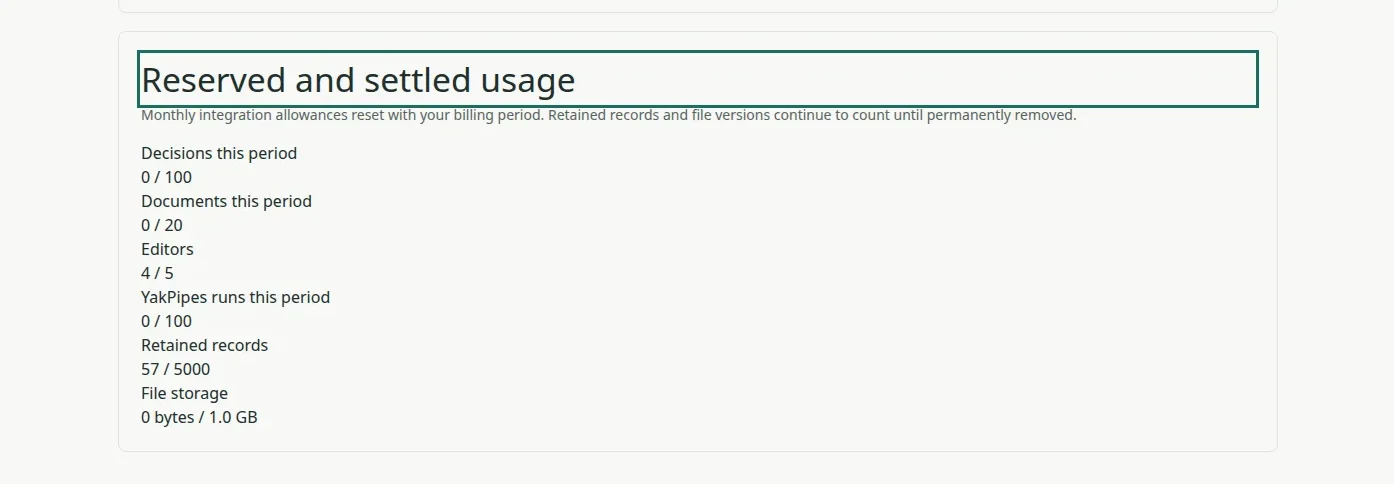
Scroll to Reserved and settled usage. Each line shows what you've used against your plan's limit, such as editors, retained records and file storage. Allowances marked this period, such as documents and YakPipes runs, reset with your billing period.
Steps
Check your plan ▶ 0:05
In the top bar, select Billing. The line under Plans and usage shows your plan, status and period end.

Read your usage ▶ 0:16
Scroll to Reserved and settled usage to compare what you've used with each limit.
Next steps
Updated 2026-10-26
billing usage limits trial plan